




🌐 中文版:用中文閱讀這篇文章 →
First, to be clear: this article isn't meant to rain on Onyx's parade just because a new device has launched. Quite the opposite — precisely because everyone's attention is on the new models right now, we think a company that makes products this good should also look back and care about its existing customers. Nobody wants an e-reader that breaks after just one or two years of normal use, and we don't believe this is the product Onyx set out to make either. We're writing this because we like the brand.
The symptom: a ghost that won't clear
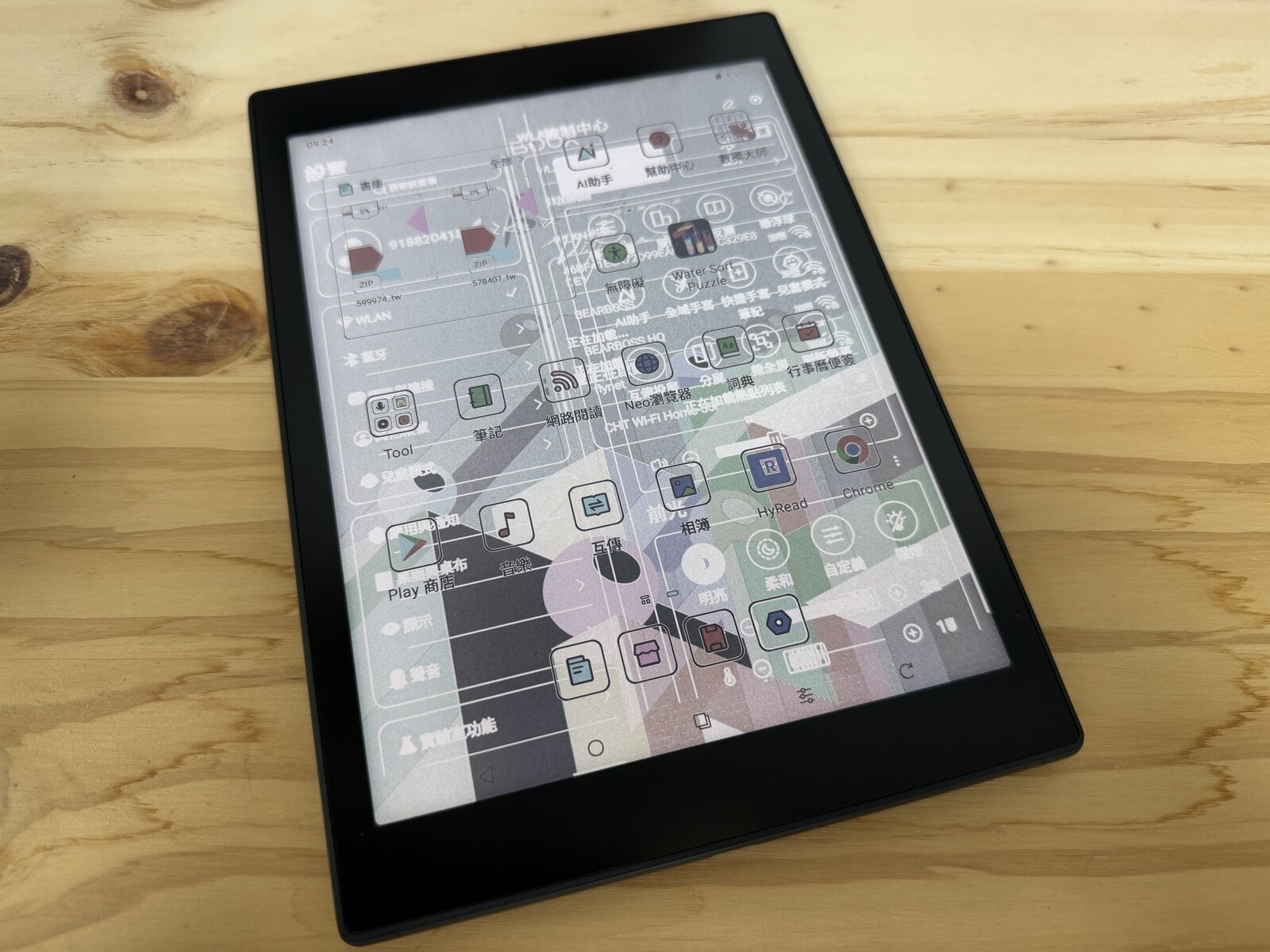
All e-paper has some ghosting — that's normal, and a full refresh usually clears it. What we're talking about is different: a near-permanent retained image, closer to burn-in / image retention. The tell-tale signs:
- A faint outline of the previous screen stays put, no matter what.
- A forced full refresh may clear some of it, but as soon as you turn the page or switch apps, the ghost comes right back.
- It gets worse over time — not present out of the box, but creeping in after a while.
If your device does this — "no matter how many times I refresh, it won't clear, and it returns instantly" — that's not a settings issue; it looks like the panel itself is failing.
A quick self-check (don't panic first)
Before worrying, run this simple test so you don't mistake normal ghosting for a fault:
- Enable the floating ball, or the bottom navigation bar, so the full refresh button is always at hand.
- On a screen with ghosting, tap full refresh once.
Then:
- One tap clears it → your device is basically fine; that's just normal e-ink ghosting.
- It takes many taps, or won't clear at all → that's the bad kind — likely the panel problem described here.
Affected models (reported)
Based on our own experience plus community reports (sorted by screen size):
| Model | Type |
|---|---|
| BOOX Palma (1st gen) | 6.13" B&W |
| BOOX Page | 7" B&W |
| BOOX Nova Air C | 7.8" Color |
| BOOX Tab Mini C | 7.8" Color |
| BOOX Note Air 3C | 10.3" Color |
| BOOX Tab Ultra C Pro | 10.3" Color |
Mostly color (Kaleido) models, though not exclusively. These are the "fast, tablet-like" generation that leans heavily on BSR (BOOX Super Refresh).
What the community says
This isn't just a Taiwan thing. On Reddit (r/Onyx_Boox, r/eink), the same complaints pile up: users describe a Tab Mini C under two years old where the ghost "disappears on full refresh but returns the moment you change apps or pages." Many point the finger at the panel's timing controller (TCON), saying "this model just has this issue," and a common warning is don't rush to update the firmware, because updates often make it worse. Tellingly, even Onyx's own Help Center has threads like "latest firmware broke the display on Ultra C Pro."
In Taiwan, it's the same story. In the Facebook group "電子書閱讀器討論區," a reader asks for help with ghosting so bad they can't get rid of it; on Mobile01, a thread is bluntly titled "Severe e-reader ghosting — worth repairing?" There, a Nova Air C owner found the official screen replacement quote was NT$7,490 — enough, they noted, to "just buy a new B&W reader." Replies call it burn-in that's technically hard to fix, and note that recent BOOX models all seem to have this, requiring a hardware repair; software updates only delay it.
How much does a new panel cost?
From Onyx Taiwan's official repair/warranty page, reference panel/screen replacement prices for the affected models (sorted by size; confirm current pricing on the official page):
| Model | Panel/screen replacement (ref.) |
|---|---|
| Palma series (6.13") | ~NT$3,600–4,700 |
| Page (7" B&W) | ~NT$4,000–4,800 |
| Nova Air C (7.8" Color) | ~NT$7,100–7,200 |
| Tab Mini C (7.8" Color) | ~NT$7,600–7,700 |
| Note Air 3C (10.3" Color) | ~NT$10,500–10,600 |
| Tab Ultra C Pro (10.3" Color) | ~NT$10,500–10,600 (est., same class as Note Air 3C) |
The Nova Air C panel quote (~NT$7,100–7,200) lines up almost exactly with that reader's NT$7,490; a Note Air 3C panel runs over NT$10,000. At those prices, no wonder people's first reaction is "just buy a new one." If the ghosting stems from an inherent design/driving cause, asking owners to swallow a "half-to-a-whole-new-device" panel bill is hard to justify.
Our theory (just a guess)
To be clear, this is our own reasoning as long-time users, not an official explanation. Every e-ink refresh applies a precise set of driving waveforms and voltages: the timing controller (TCON) generates the refresh timing/waveforms, working with a reference voltage like VCOM to rearrange the pigment particles. Ghosting is essentially particles that weren't fully "reset" — and if the waveform or VCOM is even slightly off, they don't fully return, so the ghost lingers.
Our guess: chasing "fast" (e.g., aggressive BSR high-speed refresh) without keeping the TCON driving and VCOM voltages well controlled may look great short-term but could cause irreversible panel damage over time — turning "clears on refresh" into "won't clear at all." That fits the community's "TCON failure" framing. If it's truly panel-level damage, settings and cache clears won't save it — repair generally means replacing the panel. Some readers also mention that after service, the mainboard looked like it had been reworked. We don't know the specifics — but it suggests this isn't a trivial swap. Again: this part is speculation. What's certain is the outcome — ghosting that won't clear after one or two years — the precise cause needs Onyx to speak up.
What bothers us most: the silence
So far Onyx has made no public statement and offered no recall/service program. The only official material is "how to optimize ghosting" guidance that treats it as a usage/settings matter, not a hardware defect.
On after-sales — the part we're most careful about:
The following is reported by our readers, not an official announcement. Friends and readers tell us that these repairs used to be free. Recently, though, people report being charged NT$3,000+, and even NT$7,000+ — i.e., a shift from free → half-price → full price. We're still gathering evidence; if you have a repair quote or record, please share it (see the end).
To be fair: if Onyx had announced this — "free within a certain period, chargeable afterward" — that would be entirely reasonable. The problem is that Onyx has said nothing at all: no acknowledgement, no explanation, no public policy — while the price quietly climbed from free to full. That silent shift is what feels unfair.
If it happened to you: let's make Onyx see it
Rather than quietly shelving the device, we suggest you send it in for service if you need to — the more documented cases, the harder it is for Onyx to ignore.
And a fair word for the local distributors/resellers: the root cause is Onyx's hardware/design; resellers have neither the authority nor the ability to "fix" it, and many of us have felt them genuinely trying to help. So don't take it out on the front line — aim your energy where it counts:
- Take your repair quote straight to Onyx (BOOX HQ). The quote is the best evidence of "same problem, now costs this much."
- Attach this article if useful, so Onyx sees this is being discussed publicly and isn't just one or two cases.
- Keep it factual: we're not looking for a fight — just a statement and a fair, consistent policy.
How to contact Onyx/BOOX
- Official Help Center (submit a request): https://help.boox.com/hc/en-us/requests/new
- Support page: https://shop.boox.com/pages/support
- Support email: [email protected]
- In-device feedback: go to Settings → Feedback to send the issue and screenshots directly.
- Taiwan service: arrange via the local distributor (Onyx Taiwan https://www.boox.com.tw/pages/warranty), then bring the quote to HQ.
A few tips to protect yourself
- Keep your proof of purchase; if issues appear within warranty, send it in early.
- Photograph the evidence (the ghosting, the boot screen) and note your firmware version before service.
- Be cautious with firmware updates — many report things getting worse; check the community first.
- Don't hammer full refresh all day; a genuine hardware defect won't be fixed that way and only stresses the panel.
- Run the self-check above first to confirm it's the "won't clear" kind.
Bottom line: we criticize because we care
Onyx's devices are genuinely great — the features and ecosystem are among the best in e-paper, which is exactly why so many of us stick with the brand. That's also why this treatment of long-time customers feels like such a shame. We're not writing Onyx off — we just want them to address this: give a statement, and a fair after-sales policy. The people willing to use a device for years, and keep using it, are the real loyal customers.
Have you run into this? Tell us. If your BOOX shows this kind of unclearable ghosting/burn-in, or you have a repair experience or quote to share, reach us at Email: [email protected] or on Threads: @readwithpro_tw. Your experience helps other readers in the same boat.
Some details here are reader-reported, not official Onyx announcements; panel prices are compiled from Onyx Taiwan's official repair page. Actual pricing and warranty decisions are subject to Onyx's official terms.
